0%

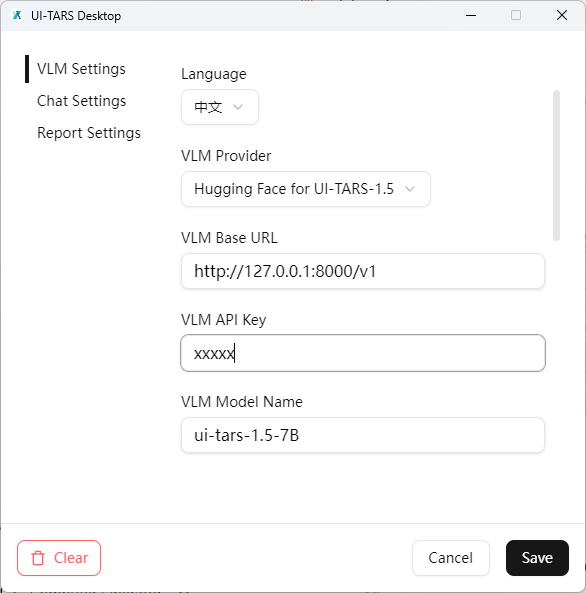
主要使用 GGUF 量化模型减少显存占用,同时使用 llama.cpp 运行模型。

部署模型

  1. pull llama.cpp 镜像
    1
    docker pull ghcr.io/ggml-org/llama.cpp:server-cuda
  2. 下载模型
    1
    huggingface-cli download Hack337/UI-TARS-1.5-7B-GGUF --local-dir /data/ui-tars/models/UI-TARS-1.5-7B-GGUF
  3. 启动容器
    1
    docker run -d -it --name ui-tars --gpus all -v /data/ui-tars/models:/models -p 8000:8000 ghcr.io/ggml-org/llama.cpp:server-cuda --port 8000 --host 0.0.0.0 -m /models/UI-TARS-1.5-7B-GGUF/UI-TARS-1.5.gguf --mmproj /models/UI-TARS-1.5-7B-GGUF/mmproj-model-f16.gguf -a ui-tars-1.5-7B --api-key xxxx -c 128000 --threads 10

配置 UI-Tars-Desktop

  1. 设置环境变量
    OPENAI_BASE_URL: https://ark.cn-beijing.volces.com/api/v3
    OPENAI_API_KEY: xxxx-xxxx-xxxx-xxxx-xxxx
  2. 修改embedding模型
    修改gui_agents/s2/core/engine.py中类名称为OpenAIEmbeddingEngineself.model变量为豆包的向量模型名称
  3. 新建main.py
    1
    2
    3
    4
    5
    6
    7
    8
    9
    10
    11
    12
    13
    14
    15
    16
    17
    18
    19
    20
    21
    22
    23
    24
    25
    26
    27
    28
    29
    30
    31
    32
    33
    34
    35
    36
    37
    38
    39
    40
    41
    42
    43
    44
    45
    46
    47
    48
    49
    50
    51
    52
    53
    54
    55
    56
    57
    58
    59
    60
    61
    62
    63
    64
    65
    66
    67
    68
    69
    70
    71
    72
    73
    74
    75
    76
    77
    78
    79
    80
    81
    82
    83
    84
    85
    86
    87
    88
    89
    90
    91
    92
    93
    94
    95
    96
    97
    98
    99
    100
    101
    102
    103
    104
    105
    106
    107
    108
    109
    110
    111
    112
    113
    114
    115
    116
    117
    118
    119
    120
    import io
    import logging
    import os
    import platform
    import sys
    import time
    from datetime import datetime

    import pyautogui
    from PIL import Image

    from gui_agents.s2.agents.agent_s import AgentS2
    from gui_agents.s2.agents.grounding import OSWorldACI


    def scale_screen_dimensions(width: int, height: int, max_dim_size: int):
    scale_factor = min(max_dim_size / width, max_dim_size / height, 1)
    safe_width = int(width * scale_factor)
    safe_height = int(height * scale_factor)
    return safe_width, safe_height

    def run_agent(agent, instruction: str, scaled_width: int, scaled_height: int):
    obs = {}
    traj = "Task:\n" + instruction
    subtask_traj = ""
    for _ in range(15):
    # Get screen shot using pyautogui
    screenshot = pyautogui.screenshot()
    screenshot = screenshot.resize((scaled_width, scaled_height), Image.LANCZOS)

    # Save the screenshot to a BytesIO object
    buffered = io.BytesIO()
    screenshot.save(buffered, format="PNG")

    # Get the byte value of the screenshot
    screenshot_bytes = buffered.getvalue()
    # Convert to base64 string.
    obs["screenshot"] = screenshot_bytes

    # Get next action code from the agent
    info, code = agent.predict(instruction=instruction, observation=obs)

    if "done" in code[0].lower() or "fail" in code[0].lower():
    if platform.system() == "Darwin":
    os.system(
    f'osascript -e \'display dialog "Task Completed" with title "OpenACI Agent" buttons "OK" default button "OK"\''
    )
    elif platform.system() == "Linux":
    os.system(
    f'zenity --info --title="OpenACI Agent" --text="Task Completed" --width=200 --height=100'
    )
    agent.update_narrative_memory(traj)
    break

    if "next" in code[0].lower():
    continue

    if "wait" in code[0].lower():
    time.sleep(5)
    continue
    else:
    time.sleep(1.0)
    print("EXECUTING CODE:", code[0])

    # Ask for permission before executing
    exec(code[0])
    time.sleep(1.0)

    # Update task and subtask trajectories and optionally the episodic memory
    traj += (
    "\n\nReflection:\n"
    + str(info["reflection"])
    + "\n\n----------------------\n\nPlan:\n"
    + info["executor_plan"]
    )
    subtask_traj = agent.update_episodic_memory(info, subtask_traj)

    current_platform = platform.system().lower()
    screen_width, screen_height = pyautogui.size()
    scaled_width, scaled_height = scale_screen_dimensions(
    screen_width, screen_height, max_dim_size=2400
    )

    # grounding_width 参数以模型为准
    engine_params = {"engine_type": 'openai', "model": "doubao-1.5-vision-pro-250328"}
    engine_params_for_grounding = {
    "engine_type": "openai",
    "model": "doubao-1.5-vision-pro-250328",
    "grounding_width": grounding_width,
    "grounding_height": screen_height
    * grounding_width
    / screen_width,
    }
    grounding_agent = OSWorldACI(
    platform=current_platform,
    engine_params_for_generation=engine_params,
    engine_params_for_grounding=engine_params_for_grounding,
    width=screen_width,
    height=screen_height,
    )

    agent = AgentS2(
    engine_params,
    grounding_agent,
    platform=current_platform,
    action_space="pyautogui",
    observation_type="mixed",
    search_engine=None,
    )
    if __name__ == '__main__':
    while True:
    query = input("Query: ")

    agent.reset()
    # Run the agent on your own device
    run_agent(agent, query, scaled_width, scaled_height)

    response = input("Would you like to provide another query? (y/n): ")
    if response.lower() != "y":
    break
  4. 运行main.py

当出现矩阵维度不兼容错误时修改 gui_agents/s2/core/knowledge.py中的KnowledgeBase类的retrieve_narrative_experience以及retrieve_episodic_experience方法,使维度对其即可。以下为示例代码。

1
2
3
4
5
6
7
8
9
10
11
12
13
14
15
16
17
18
19
20
21
22
23
24
25
26
27
28
29
30
31
32
33
34
35
36
37
38
39
40
41
42
43
44
45
46
47
48
49
50
51
52
53
54
55
56
57
58
59
60
61
62
63
64
65
66
67
68
69
70
71
72
73
74
75
76
77
78
79
80
81
82
83
84
85
86
87
88
89
90
91
92
class KnowledgeBase:
def retrieve_narrative_experience(self, instruction: str) -> Tuple[str, str]:
"""Retrieve narrative experience using embeddings"""

knowledge_base = load_knowledge_base(self.narrative_memory_path)
if not knowledge_base:
return "None", "None"

embeddings = load_embeddings(self.embeddings_path)

# Get or create instruction embedding
instruction_embedding = embeddings.get(instruction)

if instruction_embedding is None:
instruction_embedding = self.embedding_engine.get_embeddings(instruction)
embeddings[instruction] = instruction_embedding
target_dim = instruction_embedding.shape[1]
# Get or create embeddings for knowledge base entries
candidate_embeddings = []
for key in knowledge_base:
candidate_embedding = embeddings.get(key)
if candidate_embedding is None:
candidate_embedding = self.embedding_engine.get_embeddings(key)
embeddings[key] = candidate_embedding
current_dim = candidate_embedding.shape[1]
if current_dim > target_dim:
# 如果当前维度大于目标维度,进行截断
candidate_embedding = candidate_embedding[:, :target_dim]
elif current_dim < target_dim:
# 如果当前维度小于目标维度,进行填充
padding = target_dim - current_dim
candidate_embedding = np.pad(candidate_embedding, ((0, 0), (0, padding)), mode='constant',
constant_values=0)
candidate_embeddings.append(candidate_embedding)

save_embeddings(self.embeddings_path, embeddings)

similarities = cosine_similarity(
instruction_embedding, np.vstack(candidate_embeddings)
)[0]
sorted_indices = np.argsort(similarities)[::-1]

keys = list(knowledge_base.keys())
idx = 1 if keys[sorted_indices[0]] == instruction else 0
return keys[sorted_indices[idx]], knowledge_base[keys[sorted_indices[idx]]]

def retrieve_episodic_experience(self, instruction: str) -> Tuple[str, str]:
"""Retrieve similar task experience using embeddings"""

knowledge_base = load_knowledge_base(self.episodic_memory_path)
if not knowledge_base:
return "None", "None"

embeddings = load_embeddings(self.embeddings_path)

# Get or create instruction embedding
instruction_embedding = embeddings.get(instruction)

if instruction_embedding is None:
instruction_embedding = self.embedding_engine.get_embeddings(instruction)
embeddings[instruction] = instruction_embedding

target_dim = instruction_embedding.shape[1]

# Get or create embeddings for knowledge base entries
candidate_embeddings = []
for key in knowledge_base:
candidate_embedding = embeddings.get(key)
if candidate_embedding is None:
candidate_embedding = self.embedding_engine.get_embeddings(key)
embeddings[key] = candidate_embedding
current_dim = candidate_embedding.shape[1]
if current_dim > target_dim:
# 如果当前维度大于目标维度,进行截断
candidate_embedding = candidate_embedding[:, :target_dim]
elif current_dim < target_dim:
# 如果当前维度小于目标维度,进行填充
padding = target_dim - current_dim
candidate_embedding = np.pad(candidate_embedding, ((0, 0), (0, padding)), mode='constant',
constant_values=0)
candidate_embeddings.append(candidate_embedding)

save_embeddings(self.embeddings_path, embeddings)

similarities = cosine_similarity(
instruction_embedding, np.vstack(candidate_embeddings)
)[0]
sorted_indices = np.argsort(similarities)[::-1]

keys = list(knowledge_base.keys())
idx = 1 if keys[sorted_indices[0]] == instruction else 0
return keys[sorted_indices[idx]], knowledge_base[keys[sorted_indices[idx]]]

  1. 在pyproject.toml中修改如下
1
2
3
4
5
6
7
8
9
10
11
12
13
14
15
16
17
18
19
20
21
22
23
24
25
26
27
28
29
30
31
32
33
#  project.optional-dependencies中定义好的依赖不需要在dependencies中重复声明
[project.optional-dependencies]
cpu = [
"torch~=2.3.1",
"onnxruntime~=1.21.1"
]
cu121 = [
"torch>=2.3.1",
"onnxruntime-gpu~=1.21.1"
]

[tool.uv]
conflicts = [
[
{ extra = "cpu" },
{ extra = "cu121" },
],
]

[tool.uv.sources]
torch = [
{ index = "pytorch-cpu", extra = "cpu" },
{ index = "pytorch-cu121", extra = "cu121" },
]
[[tool.uv.index]]
name = "pytorch-cpu"
url = "https://download.pytorch.org/whl/cpu"
explicit = true

[[tool.uv.index]]
name = "pytorch-cu121"
url = "https://download.pytorch.org/whl/cu121"
explicit = true
  1. 同步依赖
1
2
3
4
5
6
# 使用cpu环境
uv sync --extra cpu
# 使用gpu环境
uv sync --extra cu121

# uv run 命令同样需要extra指定